
Social Media Audit
How to conduct a speedy social media audit
If you want to see impact through your social media performance, the best ways to uncover priceless insights is through performing a social media audit. Learn more in our extensive guide on how to conduct a social media audit, and download your free social media audit template here.
Reading time 17 minutes
Published on August 4, 2026
Table of Contents
Summary
- A social media audit is a comprehensive review of a brand's presence across all social media platforms.
- A social media audit can provide valuable insights into the strengths and weaknesses of your current strategy, pinpointing areas to improve and further align your strategy with business objectives.
- The process involves data collection, metric analysis and the identification of top-performing posts and channels.
- Using social media audit tools like Sprout Social, Google Analytics and Salesforce can streamline the process and provide more in-depth insights.
A social media audit is the fastest path from guesswork to a strategy that drives real results. If your social media strategy isn’t data-driven, goal-oriented and rooted in intentional decisions, run one now.
Too many brands freestyle their social presence without a plan. Some teams inherited accounts with no documentation. Others haven’t stepped back to assess what’s working and what’s wasting budget. A social media audit fixes that.
This guide walks you through a 13-step audit process, complete with actionable tips, a free downloadable template and a walkthrough of how Sprout Social makes every audit faster and more precise.
What is a social media audit?
A social media audit is a comprehensive review of your brand’s social media presence across all active platforms, covering profile information, content performance, audience demographics, engagement metrics and competitive positioning. Social media managers, marketing teams and agencies use audits to identify what’s working, fix what isn’t and align their social strategy with measurable business goals.
Run one quarterly. High-volume publishing teams benefit from lighter monthly check-ins to stay ahead of performance shifts before they compound.
What are the benefits of a social media audit?
A social media audit delivers four measurable outcomes that move your strategy from reactive to intentional.
- Get a clear picture of your current performance: An audit surfaces your key social media metrics—engagement rates, reach and audience growth—giving you a data-driven foundation for every decision you make next.
- Pinpoint where your strategy needs work: Analyzing content performance, audience demographics and competitor activity reveals what’s driving results and what’s dragging them down.
- Align social activity with real business goals: An audit shows which social efforts contribute to your core objectives—whether that’s driving website traffic, generating leads or building brand awareness—so you stop wasting time on activity that doesn’t drive revenue.
- Spot growth opportunities before your competitors do: An audit exposes untapped audience segments, underperforming content formats and emerging platforms worth investing in before the window closes.
How often should you run a social media audit?
Run a full social media audit on a quarterly cadence. That rhythm gives your team enough time to spot patterns, implement strategic changes and measure progress before the next cycle begins without letting issues compound between reviews.
Layer in a lighter monthly check-in if any of the following apply to your team:
- You publish at high volume across multiple profiles
- You manage customer care across social platforms
- Your team recently onboarded new members or inherited existing accounts
- You’re actively running paid campaigns alongside organic content
Also trigger an unscheduled audit after any major campaign wrap-up, rebrand, team transition or platform shift. These moments introduce enough change that waiting for your next quarterly review risks missing critical performance signals.
The most important thing isn’t the exact cadence; it’s treating your audit as a documented, repeatable business process rather than a once-a-year scramble. Teams that audit consistently make faster decisions and build stronger social programs over time.
How to perform a social media audit in 13 steps
A social media audit gives you a clear, data-backed picture of what’s working, what’s wasting resources and where your biggest growth opportunities are hiding. Follow these 13 steps to complete yours.
Or, download our free social media audit template and plug in your numbers. If you’re already using Sprout Social, your key audit metrics are available in one place with no manual data-pulling required.
1. Take inventory of active and inactive social profiles
Start by cataloging every social profile your brand owns, not just the obvious ones. That YouTube channel with two subscribers and the Pinterest profile you haven’t touched in three years both count.
You don’t need to agonize over dormant platforms, but confirm you’ve claimed those accounts and that they’re under your company’s control. Sprout Social’s social media audit template has tabs for all major networks, with space in the summary tab to list every active and inactive profile in one place.
With your profiles accounted for, define your priorities—these are the platforms where you’ll focus on building your social presence. You’ll be surprised which platforms are gaining the most traction.
2. Define specific goals for each platform
Define clear goals for each active network before you analyze a single metric. The data you collect during your audit must map directly to these objectives.
Connect your social media goals to overall business objectives, but also account for how your audience behaves on each platform. If your leadership team wants audience growth on TikTok but users primarily discover your brand through the For You Page, focus on maximizing views. That’s where the real signal is. Your audit data backs that decision.
Focus on the social media metrics that reflect your goals. You don’t need to fill in every blank during your first audit.
3. Align your branding, language and identity
Inconsistent branding erodes audience trust faster than you’d expect. Audit every profile against your brand identity standards and check each of these elements:
- Bio and “About” language (refer to your style guide when in doubt)
- Profile and banner images
- Destination URLs and landing pages
- Hashtags
Brands running seasonal campaigns need regular check-ups. Outdated holiday creatives in mid-March signal a brand that isn’t paying attention, and your audience notices.
Maintaining visual consistency across 10+ profiles is where teams break down. Sprout Social’s Asset Library stores your approved brand visuals, templates and messaging in one place, so every piece of content that goes out reflects your brand standards, not whoever happened to be publishing that day.
4. Open up your social media analytics
With your profiles prepped, pull the data to uncover what’s actually driving impact. A social media analytics tool like Sprout Social lets you quickly surface the metrics you need to get the full picture—without toggling between six different native dashboards.
Sprout Social’s Cross-Platform Profile Performance Report aggregates key analytics from Facebook, X (formerly known as Twitter), Instagram, Pinterest, LinkedIn, YouTube and TikTok for a well-defined understanding of how your platforms compare.

If you want to move faster, Sprout Social’s Trellis AI lets you ask natural-language questions directly across your reporting data. Instead of building a custom report from scratch, type your question and get an answer. It’s the difference between spending an afternoon in spreadsheets and spending 20 minutes on the insights that matter.
Not using Sprout Social yet? Use the audit template to determine which metrics to track, including engagement, link clicks, shares, referral traffic and impressions. Consistent tracking makes this step exponentially more insightful over time.
Download the social media audit template
5. Identify your top-performing social media posts
Individual post performance reveals exactly what your audience wants, and that intelligence shapes every content decision going forward. For each network, analyze performance across these key metrics:
- Impressions (or views)
- Engagements (comments, likes and saves)
- Reach
Sprout Social’s Post Performance Report ranks your top-performing posts over any time period, so you see which content your audience prefers without manually sorting through every post.

Go deeper by categorizing top posts by format, including video, promotional, educational, entertainment or rich media. That breakdown tells you what’s working on each platform and what to prioritize in next month’s social media calendar.
6. Benchmark your performance against competitors
Knowing how your content performs in isolation is useful. Knowing how it performs against competitors turns your audit into a competitive intelligence asset. Pull competitor performance data and look for patterns across these areas:
- Audience growth rate: Are competitors gaining followers faster on specific platforms? That signals where attention is shifting.
- Engagement benchmarks: A high follower count means nothing if engagement is flat. Compare engagement rates by platform and content type to find the gaps.
- Content themes and posting frequency: What topics drive their highest-performing posts? Use those signals to stress-test your own strategy.
- Share of voice: How much of the conversation in your category does your brand own vs. competitors?
Sprout Social’s Competitor Performance Report gives you a side-by-side view of your social presence versus industry peers, so you can benchmark against others in your industry without manual research.
For a deeper competitive signal, use Sprout Social’s social listening tools to track competitor mentions, sentiment trends and share of voice in real time—not just at audit time.
7. Audit your social media listening for competitive signals
Your audit should not stop at published posts and profile metrics. You also need to understand what people are saying around your brand, your industry and your competitors.
Review the conversations that keep showing up. Look for repeated questions, sentiment shifts, competitor mentions and emerging themes. This step exposes gaps in your content strategy and uncovers opportunities your reporting alone will miss.
Most brands use social listening to track what’s being said. The smartest brands use it to hear what’s not being said. The real insights are in the gaps: the unmet needs, the unanswered questions and the competitor weaknesses your audience is broadcasting in plain sight.
Sprout Social’s Listening tool surfaces share-of-voice data, competitor sentiment trends and emerging topics that point-in-time analytics miss. Use it to extend your audit from a backward-looking analytics exercise into real-time competitive and market intelligence.
8. Track how your social traffic drives website revenue
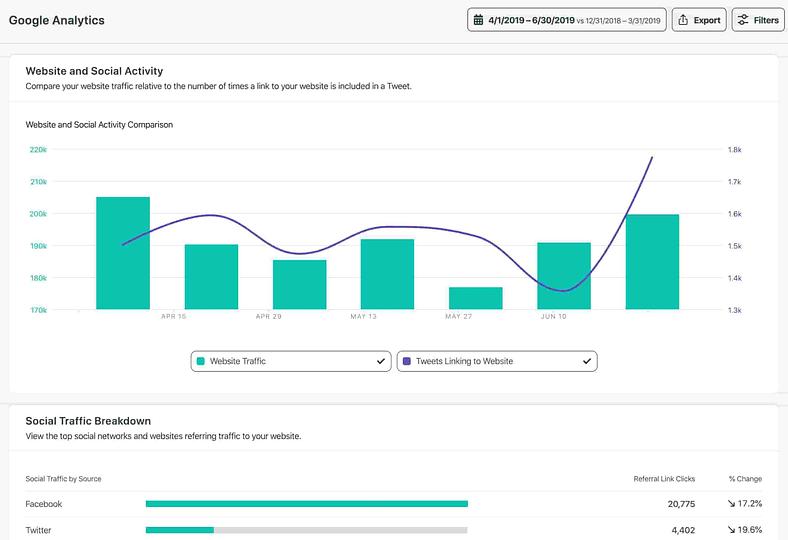
Your social media presence must connect directly to website traffic and lead generation, not operate as a separate silo. Identify which posts spark genuine interest and which platforms drive the most qualified traffic.
If you have Google Analytics set up, go to Acquisition and filter by Social to see which networks send traffic your way and which underperform. Sprout Social also lets you find the correlation between your social media followers and website traffic for a broader view of social’s impact on audience behavior.
9. Dig into demographic data
What you post and how you say it depends on who’s seeing it. Messaging for Gen Z and millennials versus Gen X is a different creative exercise—your audit confirms whether you’re reaching the right people. Pull demographic data for each active platform and check for these signals:
- Age range: Does your audience age bracket match your target customer profile? A mismatch signals a content or platform strategy issue.
- Location: Are you reaching the right geographic markets? International brands should check for regional performance gaps.
- Gender breakdown: Compare audience gender split to your buyer persona data to confirm alignment.
- Active times: When is your audience online? Use this to inform your publishing schedule going forward. Sprout Social’s ViralPost® feature takes this further. It automatically identifies the optimal send times for your specific audience so you stop guessing and start publishing when it counts.
If your audit reveals a demographic mismatch, use that data to advocate for a content pivot. Hard numbers are far more persuasive to leadership than gut instinct.
10. Assess opportunities from new social media platforms
Social media fragmentation accelerates every year. Not every new platform sticks, but early adopters consistently capture audience attention before competitors arrive.
TikTok’s explosive growth after being dismissed as a secondary network is the clearest proof of that. The buzz around Threads and Bluesky reinforces the same pattern. In your audit, flag new platforms worth exploring. The Sprout Social audit template includes a section for these notes in the “Summary” tab.
When you identify a platform worth testing, the barrier to entry matters. Sprout Social’s publishing tools support Threads, Bluesky, Snapchat and all major platforms, so expanding to a new platform doesn’t mean rebuilding your workflow from scratch.
Keeping tabs on new and emerging social media trends is how forward-thinking brands stay ahead of the curve rather than chasing it.
11. Check profile security and compliance
A strong audit also checks the health of your accounts behind the scenes. Review who has access to each profile, remove outdated permissions and confirm your approval process is still working the way it should.
Check for inactive users, old integrations, missing account details and any profile risks that can slow your team down or create brand issues. If your team works in a regulated space, this step matters even more. Sprout Social’s Guardian feature handles content compliance and brand safety at scale, including automated data masking, blocked words and approval workflows that keep your team protected without slowing publishing down.
Clean access. Clear governance. Fewer surprises.
12. Set concrete objectives and action items
Your audit data is only valuable if it drives decisions. Use what you’ve gathered to set concrete objectives, like growing followers on a specific platform, increasing engagement or tightening your lead generation strategy.
The audit template includes a SWOT (strengths, weaknesses, opportunities, threats) analysis section for each network. Use it to capture big-picture takeaways or conduct a full SWOT analysis after your audit. With your KPIs in hand, you have everything you need to make informed, defensible decisions.
13. Share your audit with your team
Social media doesn’t operate in isolation, and neither should your audit results. With the rise of social commerce and social search, your presence shapes decisions across the entire organization. Sharing your audit helps you:
- Secure additional buy-in and resources from managers and key stakeholders
- Develop new marketing content that mirrors your top-performing posts and platforms
- Uncover opportunities to align your social presence across departments, including sales
The most effective audits don’t stay in a spreadsheet. Sprout Social’s automated report scheduling delivers audit findings directly to stakeholders on a recurring cadence. No manual sending is required. And with Trellis AI, you can generate plain-language summaries of your social performance data that any department head can understand and act on, even if they don’t live in the platform every day.
A documented audit reinforces the value of treating social media reporting as an ongoing strategic process—not a one-time project. Share it broadly and your audit becomes an organizational asset instead of a team-only deliverable.
How to conduct a social media audit in Sprout Social
Sprout Social’s reporting suite gives you a centralized, data-backed view of your social performance across every profile, platform and campaign. Here’s how to run a full social media audit step by step, so you know exactly what to improve and where to invest next.
1. Access the reporting section
Open Sprout Social and click the Reports tab in the left-hand navigation menu. This is your command center for pulling high-level performance snapshots or drilling into specific campaigns across all connected profiles.

2. Choose the right report based on your goal
Start by asking: What do I need to learn? Then select the report that matches your objective:
- Profile Performance: Tracks overall account health, follower growth and engagement trends over time.
- Post Performance: Delivers detailed metrics on individual posts—clicks, shares, likes and replies—so you identify which content formats resonate most.
- Tag Performance: Compares engagement across content themes and campaigns, such as behind-the-scenes content vs. product launches.
- Competitor Performance: Shows a side-by-side view of your social presence vs. competitors, highlighting engagement, growth and content differences to help you benchmark against others in your industry.
Once you select the right report, apply filters to explore the data in more detail.
3. Customize and filter your reports to get deeper insights
Filters transform raw numbers into actionable intelligence. Break down your data by platform, profile, content type, time frame and publishing status.
Use the last 30 days for monthly reviews, the last quarter for campaign wrap-ups or set a custom range to isolate specific events—like comparing engagement from a March campaign to a November holiday push.

Network and profile
Different platforms serve different purposes. Your LinkedIn audience wants thought leadership and industry news, while your TikTok audience responds to behind-the-scenes content and short-form video. Lumping them together blurs what’s working. To isolate performance by network, click the Sources dropdown and choose a specific network, a business unit or a group of profiles.
Post type
Use the Post Type filter inside your Post Performance report to compare formats side by side:
- Reels to check reach and engagement on Instagram
- Replies to see how customer support content performs on X (formerly known as Twitter)
- Stories to measure engagement with time-sensitive updates
- Ad Posts to separate promoted content from organic

Published status
For example, if you manage social for a project management software brand, filtering by post type reveals that Reels drive twice the reach while Carousels earn more saves and profile clicks. People discover through Reels and return to Carousels when they’re ready to learn. That insight directly shapes your content strategy.
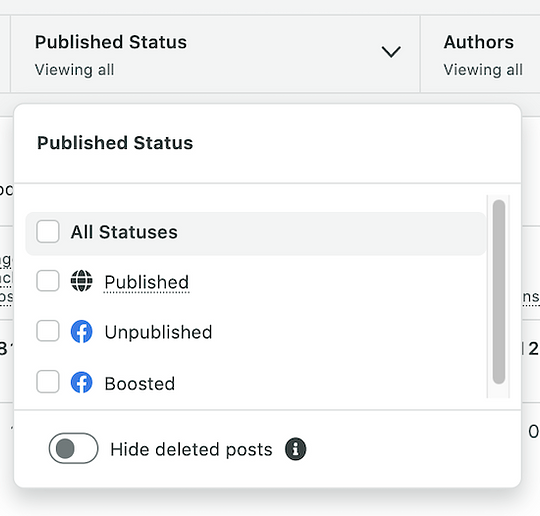
Sprout Social’s Published Status filter sorts content by what went live, what you promoted and what stayed in draft—so you separate organic performance from paid and verify that scheduled content published.
- Published: All posts successfully published across connected social networks
- Unpublished: Drafts or posts that haven’t gone live yet
- Boosted: Posts promoted with ad spend
4. Analyze key insights
Numbers without context are just noise. The goal is to find trends, outliers and opportunities, then connect them to real business outcomes.
Start with Sprout Social’s Profile Performance report to spot long-term trends across impressions, engagement rate, link clicks and follower growth. Use the date filter to put the numbers in context:
- Last 30 days for quick wins
- Last quarter for campaign-level insights
- Year-over-year for seasonal or annual shifts
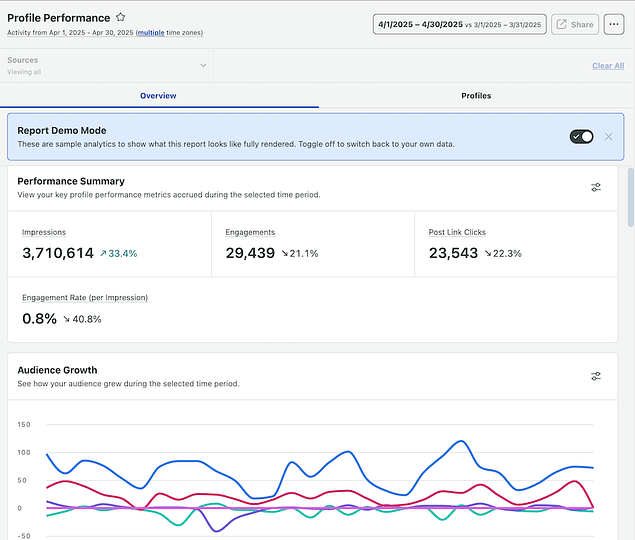
Say you filter for the last 90 days and notice engagement spikes every Friday. You check the Post Performance report and find the pattern: Friday posts are behind-the-scenes Reels showing your team packing weekend orders. They’re short, personal and consistently earning more shares and saves than anything else. With that insight, you prioritize Fridays in your content calendar, build a recurring BTS Reel series and tag them in Sprout Social to track performance over time.
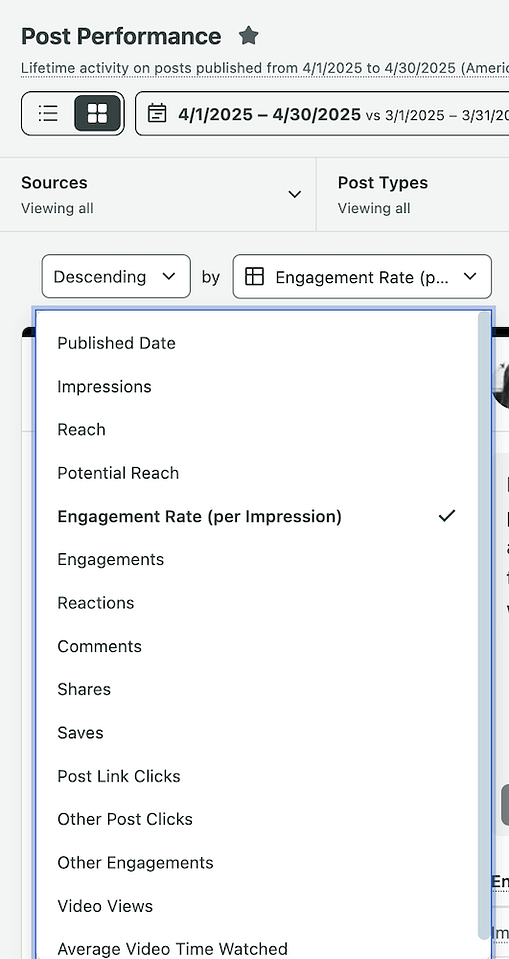
Next, use the Post Performance report to find what resonated most. Sort your posts by:
- Engagement rate to see which posts your audience actively interacted with
- Clicks to highlight what drove traffic
- Reach to understand what got the most exposure
- Platform or post type to break down patterns across formats
Pro tip: Review the top 10–15 posts—not just the top one or two. That range reveals what your audience consistently cares about, not just what went viral once. Our guide on social media metrics helps you decide which numbers matter most for your goals.
Now flip your view and sort from lowest engagement to highest. Low performers reveal the biggest lessons, including messaging that missed the mark, format mismatches or weak CTAs. Check for:
- Timing issues: Did you publish when your audience wasn’t active?
- Format mismatch: Did you post a text-heavy PDF on Instagram or a video without captions on LinkedIn?
- Weak visuals: Did the creative feel off-brand, cluttered or hard to read on mobile?
- Missing CTA: Did the caption invite action—click, comment or share—or did it just end?
Connect your findings to business goals. The metrics that matter depend on what you’re trying to achieve:
- Brand awareness: Track impressions, reach, shares and video views to measure how far your message spreads.
- Community engagement: Monitor comments, replies, saves and DMs to gauge whether people connect with your content.
- Traffic, sign-ups or sales: Prioritize link clicks and profile visits—these signal intent and demonstrate ROI.
If you’re still defining your objectives, our guide on setting social media goals helps you identify the right metrics to focus on.
5. Automate, export and share reports
Once you’ve pulled key insights, share the story with your team, clients or leadership. To export a visual report, open any report—like Profile Performance or Tag Performance—click Share and choose PDF or CSV.

Pro tip: Use the PDF version to share wins and trends with clients or leadership. Use CSV when you need to dig deeper into the raw data.
Sprout Social also lets you schedule reports to go out automatically each week or month, so your team gets regular updates without manual effort. To set this up, click Share > Schedule Report, choose your recipients (up to 25), set your frequency and name your export.
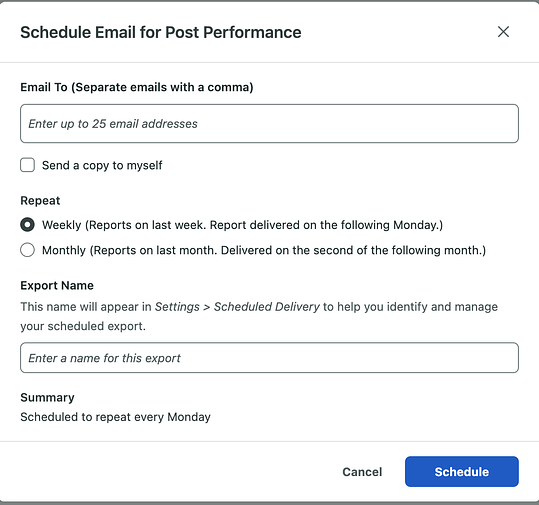
Need a walkthrough? Sprout Social’s Scheduling and Sending Report guide covers every step.
6. Optimize your social media strategy
Your audit findings are only valuable if you act on them. Double down on what works, rethink what doesn’t and tailor content to fit each platform.
- Focus on what works: Identify what made your top-performing posts click—format, timing or tone. If Instagram Reels with quick tips consistently drive saves and profile visits, build a recurring series into your calendar.
- Tweak or pause what underperforms: Low performers often need format, timing or clarity fixes. If a LinkedIn carousel didn’t land, adjust the headline or sharpen the CTA before scrapping the topic entirely.
- Match content to network goals: If explainer Reels perform on Instagram but fall flat on LinkedIn, use them where they deliver and pivot to in-depth content like customer stories on LinkedIn.
Sprout Social makes it easy to keep refining your social media content strategy as you go. Tag posts—like “Test: Friendly Tone”—then track performance using the Tag Performance report. To create and manage tags, click Tag, choose from the dropdown or type a new tag, then press Enter. Sprout Social saves it automatically.
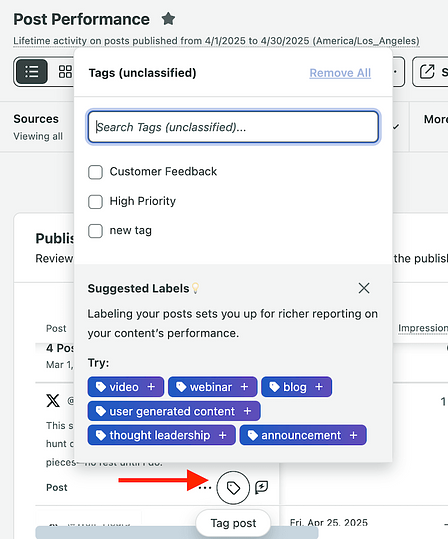
Schedule weekly or monthly performance reports to monitor your progress automatically so you spot wins and make adjustments without digging through data manually.
A social media audit template to enhance your strategy
Sprout Social’s free social media audit template automates the data collection.. Just plug in your numbers. If you’re already using a social media analytics tool like Sprout Social, pulling your key audit metrics takes minutes, not hours.
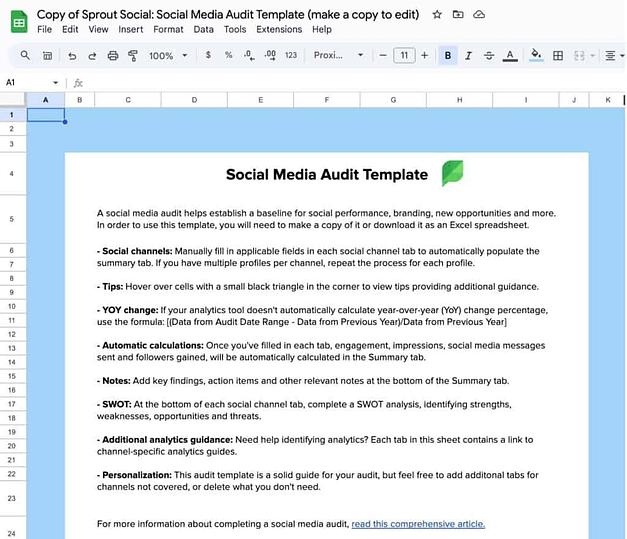
Download our free social media audit template
Customize the template to fit your brand’s goals. At minimum, include these six data points:
- Profile information: Name and URL for every active account
- Engagement metrics: Likes, comments, shares and saves by platform
- Publishing metrics: Post frequency, content types and optimal send times
- Audience demographics: Age, location and follower growth trends
- Referral traffic: Sessions driven from each social platform to your site
- Platform-specific metrics: Reach, impressions and any native KPIs unique to each network
Always track % change from the previous month and the previous year. Year-over-year comparisons are essential for brands with seasonal spikes. Holiday surges, for example, will skew month-over-month data and obscure your true baseline.
Examples of an effective social media audit
The right audit format depends on your team size, publishing volume and how you plan to use the results. Here are three approaches that deliver real results:
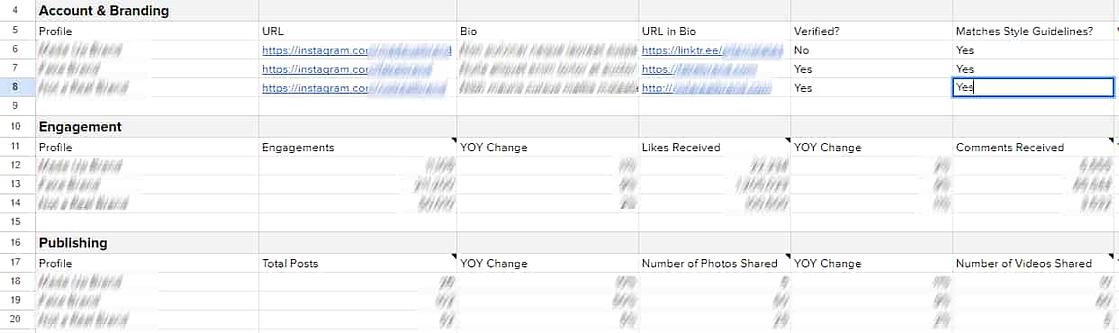
Example #1: The in-depth audit
An in-depth audit tracks engagement, audience growth and publishing frequency across multiple accounts. It’s built for brands posting at high volume who need to know exactly what’s driving performance and what’s dragging it down.
Example #2: The quick audit
A quick audit uses yes-or-no questions to surface high-level answers fast. Use it to check the fundamentals across every account without getting buried in data.
- Are brand logos and creative consistent across social media platforms?
- Has new content been published on each network within the past week?
- Have all social customer service questions and concerns received a response?
- Are bio links pointing to the most current promotions or campaigns?
- Which platform is currently the most engaged or fastest growing?

Quick audits cover big-picture details with fewer data points. They won’t replace a deep-dive analysis, but they keep your accounts active and accountable between full reviews.
Example #3: The social media agency audit
For social media marketing agencies managing multiple clients, a visually compelling deck outperforms a spreadsheet every time. A well-designed deck distills complex data into clear takeaways that reinforce your expertise and make the audit immediately actionable for clients.

What social media audit tools should you be using?
The right tools depend on the depth and frequency of your audits. At minimum, you need an analytics platform, a website traffic tool and a way to connect social data to business outcomes. Here’s how the three tools in this section fit together:
| Tool | Primary function | Audit value |
|---|---|---|
| Sprout Social | Cross-platform social analytics and reporting | Track, compare and act on performance across every network in one place |
| Google Analytics (GA4) | Website traffic and acquisition data | Connect social referral traffic to on-site behavior and conversions |
| Salesforce | CRM and customer data | Tie social touchpoints to tangible business outcomes for stakeholders |
Sprout Social
Sprout Social centralizes your social media audit into a single workflow, giving you cross-platform analytics across Facebook, X (formerly Twitter), Instagram, LinkedIn, Pinterest and more, all without switching tabs.
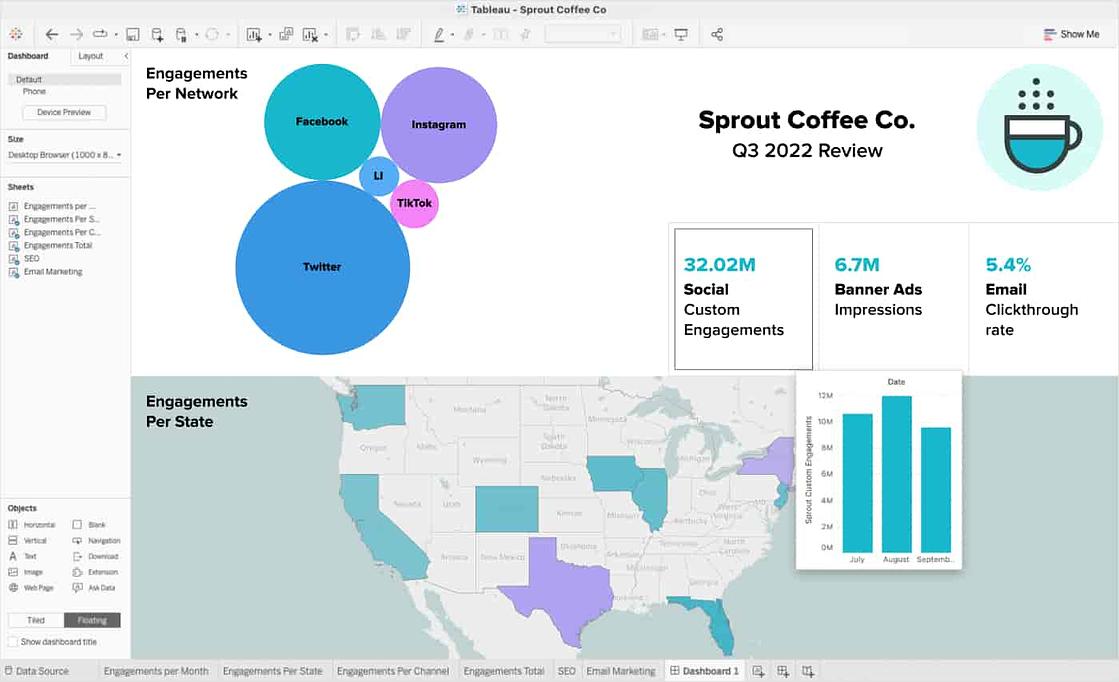
Sprout Social’s Premium Analytics add-on cuts audit report creation time significantly. Dynamic links, selectable metrics and interactive charts produce presentation-ready reports that prove the impact of your social strategy to leadership.

Google Analytics
GA4 is already in your tech stack, so use it. Integrating Google data into your audit connects social referral traffic to landing page performance and search presence, giving you a fuller picture of how social drives site behavior.

Salesforce
Integrating Salesforce with your social data transforms audit findings into executive-ready proof. You track the social touchpoints that lead to real business outcomes, the kind of evidence that wins budget and builds internal credibility.
Turn your next audit into a growth strategy
A strong social media audit does more than organize your numbers. It sharpens your strategy, closes the gap between your social efforts and business goals and gives you the evidence you need to earn leadership buy-in.
According to the 2025 Impact of Social Media Report, 58% of teams rated as “experts” at measuring the business impact of social rely on social media management tools. Teams that run audits consistently make faster decisions, justify bigger budgets and build stronger social programs over time.
Download Sprout Social’s free social media audit template to get started. Then test Sprout Social’s capabilities with a free 30-day trial to see how every audit becomes faster and more actionable.
FAQs about social media audits
How often should I run a social media audit?
Run a full social media audit at least once per quarter. Add a lighter monthly check-in if you manage multiple profiles, publish at high volume or run ongoing campaigns. Also conduct an unscheduled audit after any major campaign, rebrand or platform change.
Can AI tools help with a social media audit?
AI accelerates every stage of a social media audit, from data collection to insight generation. Instead of manually pulling metrics from six different platforms, AI surfaces patterns, flags anomalies and summarizes performance trends in plain language so you act faster.
Sprout Social’s Trellis AI takes this further. Ask natural-language questions across your Publishing, Inbox, Listening and Reporting data, and get answers without building a single custom report. Trellis Studio automates recurring analysis through scheduled Skills, so your audit insights arrive on a cadence rather than requiring manual effort each time. AI sharpens your judgment. It doesn’t replace it.
How much does a social media audit cost?
That depends on the scope. A DIY audit costs your team time. A larger audit handled by an agency or consultant costs more because it usually includes competitive research, platform-specific recommendations and a final strategy readout. If you already use a social media management platform, you lower that lift by pulling your reporting, benchmarking and analysis from one place.
What's the difference between a social media audit and social media reporting?
Social media reporting shows what happened during a specific time period. A social media audit goes further. It reviews your profiles, branding, audience, content, traffic and competitive position so you can decide what to change next. Reporting tracks performance. An audit resets strategy.
Additional resources for Social Media Audit

How to conduct a speedy social media audit

Pinterest audit: A step-by-step guide to driving long-term ROI

How to do a Facebook audit in 30 minutes or less

10 steps to performing a successful Instagram audit

How to conduct a TikTok audit in 6 steps

How to conduct a YouTube audit in 5 steps

How to conduct a Twitter audit to improve your brand’s presence

How to conduct a LinkedIn audit that brings your brand to life


Share